

Overview
Multi-SKU label management means modular prepress work that splits each label into structured database fields, images, regulatory warnings, barcodes, so you can maintain hundreds of SKUs without losing your mind
When a food or beverage brand sends hundreds of stickers to press in one batch, version chaos and missed edits are the top causes of reprints
For complex jobs like these, the Mai Strategy Knowledge Academy team lays out a four-layer separation method and a prepress safety net: split label data into fixed zones and variable fields first, then let AI do the first pass and batch layout. Accuracy and proofing speed both jump
Why do hundreds of SKU labels fall apart the moment you revise them?
After years on the print floor, I can tell you the biggest trap with multi-SKU labels is the small layout tweaks
When one product line branches into dozens of flavors or channel variants, designers who duplicate files by hand run into missing fonts, shifted die cuts, and copied warning text gone wrong
Taiwan's Act Governing Food Safety and Sanitation is strict on font sizes for nutrition facts and allergen statements, miss one line and the whole batch goes in the bin
Don't open the file yet
Before anyone touches the design, building a clean label database structure is what actually fixes the mess
On real jobs we tell clients to split label content into shared fields and variable fields, no exceptions
Shared fields cover the brand mark, company info, and standard compliance items; variable fields hold the SKU name, barcode, ingredient list, net weight, and nutrition panel
Keeping these two groups separate in a spreadsheet or database is the foundation that makes AI batch generation work later
How does the four-layer separation method keep AI batch generation in check?
The scary part of letting AI auto-fill data into multiple label versions is the layout quietly drifting as it scales
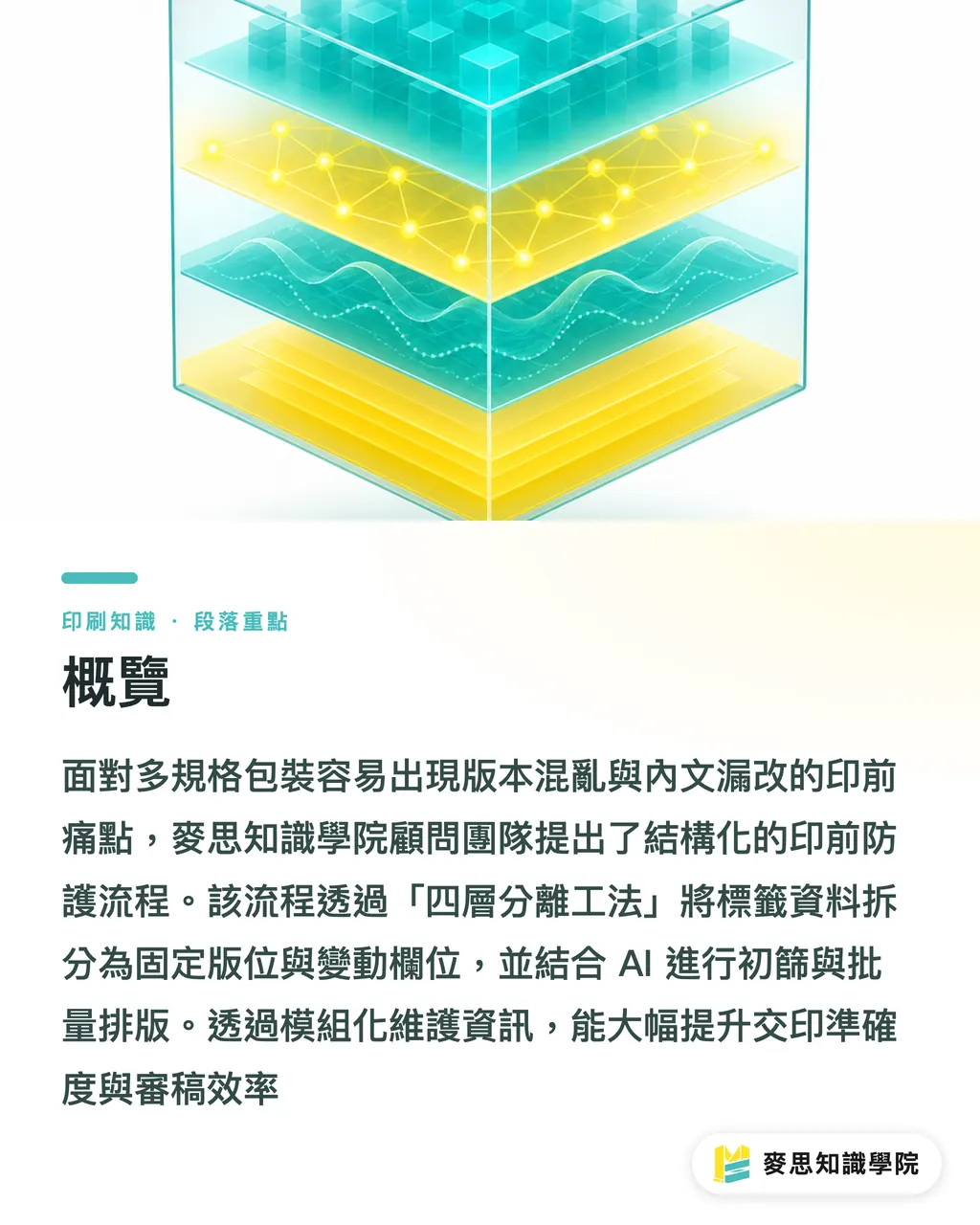
To keep batch output print-ready, MINDS proposes a four-layer separation structure that draws hard lines around what AI can touch
It splits the label into four independent layers:
・Die line and bleed layer: locks the trim boundary, bleed area, and bleed proof line. No automated element gets to move these
・Key visual and background layer: holds brand color, series artwork, and main graphics. Keeps the line visually consistent across variants
・Variable text and barcode layer: bound to database fields, auto-pulls SKU name, ingredients, and barcode, and checks for line breaks and missing glyphs on the fly
・Regulatory warning and certification layer: holds certifications and mandatory warnings for each channel and export market, kept apart from everything else
With these four layers clearly isolated, AI can only drop text and images into the designated variable slots. It won't budge the die line or shift the visual axis
That's enough
This kind of layer-level lockdown keeps design scaling disciplined and cuts the proofing load dramatically

How do you automate compliance checks across regions and channels?
Labels that ship across borders or land in multiple channels pile on complexity because each market has its own rule set
Taiwan's CNS, China's GB, and Japan's JAS each want different ingredient orderings and allergen statement formats
For AI to run the first compliance pass, feed the regional regulations and prohibited-term lists into the review model and have it compare text in real time
If a Japan-bound label is missing its allergen line, or a Taiwan channel label has font smaller than the legal 2 mm, the system flags it right away
That said, human-machine collaboration needs a clear line of responsibility. AI is good at repetitive format matching and keyword screening; the final legal compliance call still belongs to a trained QA person
Channel specs differ too, mass retailers and e-commerce platforms have different barcode grading requirements
Automated tools can check bar width ratio and printed dimensions at export time, so products don't end up on shelves where scanners can't read them
How do you set up automated prepress review and QA checkpoints?
After AI batch generation finishes, how do you make sure the file reaching the printer is bulletproof?
The Mai Strategy Knowledge Academy team runs what they call the MINDS three-gate delivery check (MS, mid-to-high-end fully custom commercial print) across every prepress job, standardizing the flow so errors stop at the door:
・① Field and layout validation: before export, auto-checks database fields against the layout for overflow, line breaks, text overlap, and missing glyphs
・② Automated version comparison: overlays the new file on the previous proof using image diff, marking exactly what changed
・③ Final manifest and proof cross-check: produces a delivery manifest and digital proof for each SKU, signed off by print procurement and the production line
These three gates make sure design and production are reading the same script
File communication eats about 40% of our day. Once this checkpoint system is in place, the production line and design team stop eyeballing hundreds of sticker files and start producing accurately

Key Takeaways
・The core of multi-SKU label management is splitting shared fields from variable fields and building a structured database from the start
・Use the four-layer separation structure to isolate die line, visuals, text, and regulatory layers, so AI batch generation can't warp the layout
・AI handles regional format and warning screening well, but final compliance sign-off stays with a trained QA person
・The MINDS three-gate delivery check (MS) catches line breaks, missing glyphs, and version drift before files leave the building
Further Thinking
As multi-SKU product lines keep expanding, manufacturers and design teams shouldn't treat AI as a fancy auto-draw tool. Think of it as the automation engine wired into your prepress database
From data structure design and layer permission isolation all the way to final proof cross-checking, building a repeatable prepress SOP is the real lever brands have for cutting error cost and gaining supply chain flexibility in a multi-channel world
Further Reading
FAQ
- When AI batch-generates label files, how do you stop die cuts from drifting across different package sizes?
- Layer isolation is the fix. [MINDS](https://www.mindscmyk.com/) recommends the four-layer separation structure: lock the die line and bleed layer completely, and only open the text and image layers for AI to fill in variable data
- For multi-country label exports, can AI handle cross-border regulatory review on its own?
- AI can run text format and warning screening against databases like Taiwan CNS, China GB, or Japan JAS, but legal compliance can't be handed off to a machine. A trained QA person still needs to give the final sign-off
- Before sending a multi-SKU job to print, how should procurement confirm version accuracy with the printer?
- Run the MINDS three-gate delivery check (MS): before delivery, require the design side to provide field-check results, before/after image diffs, and a final manifest that lists each SKU with its digital proof for sign-off
Related articles


The Print × AI weekly
The print and AI know-how designers, brands and enterprises can use before they commit — one email, every week
MINDS Free Tools
AI background removal, brand stamping, and a LINE sticker maker — free design tools, right in your browser, no upload.
MINDS Group
Need actual printing or gifting services?
From premium printing to online ordering and festive gifts — the MINDS Group sister brands take it from here.